
Knowledge Base · Website Creation
Launching a New Website: The Checklist for those not building the site themselves
Launching a new website goes smoothly if you redirect old addresses, remove the “noindex” test setting, test a form with a real submission, check your email, and submit the sitemap to Google. This page outlines these five checks and the rest across four phases, detailing how to verify each point yourself.
In this article
I am Martin de Smit, and I migrate websites for small businesses and practices.
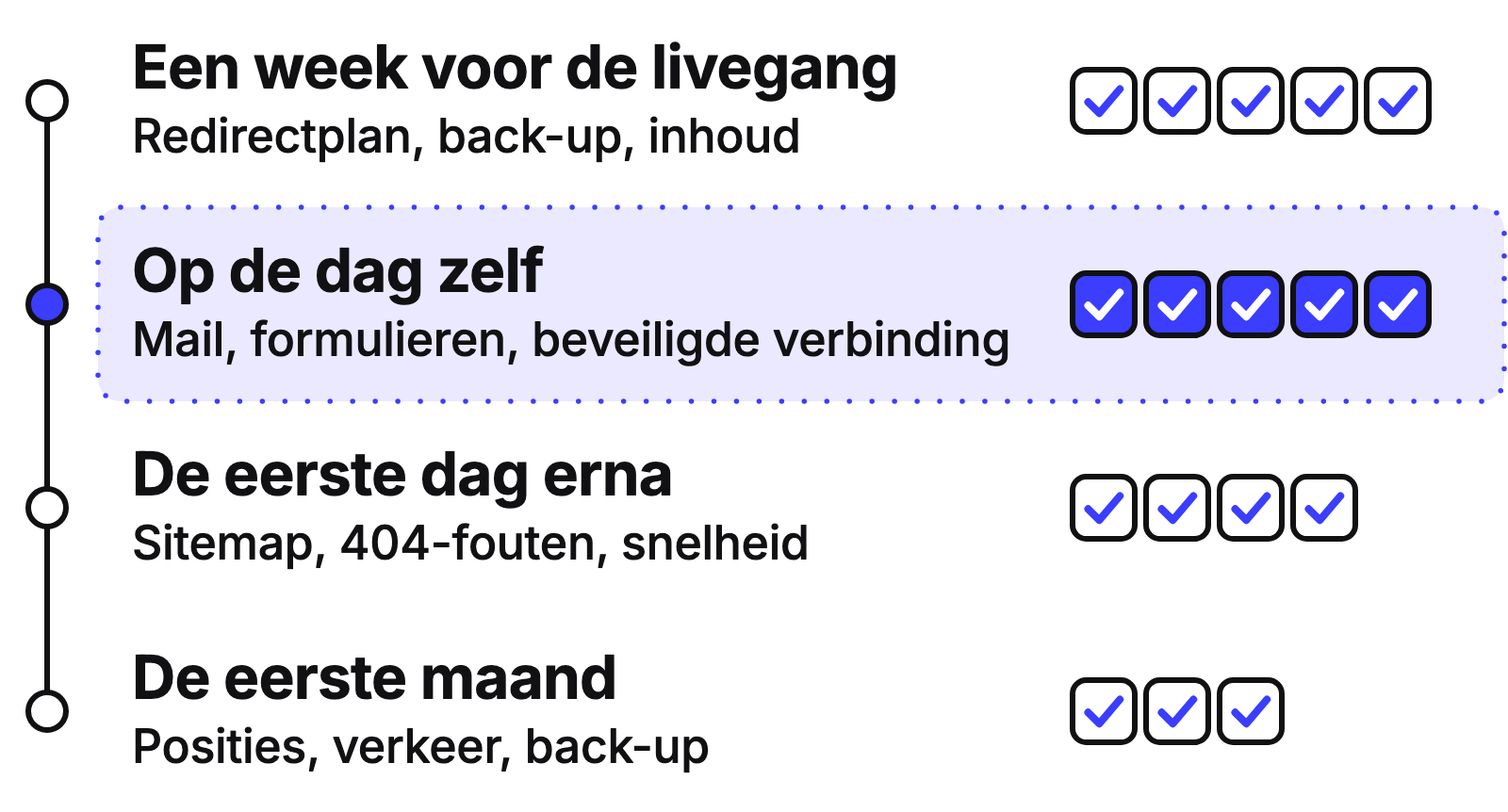
Seventeen checks in four phases: most occur before and on the day the site goes live.
What happens when you put a website online?
Putting a website online or going live means that your domain name, for example, yourcompany.co.uk, points to the new site instead of the old one or a test version from a specific moment. Until that transition, no one views the new site except you and your developer.
Therefore, the risk is concentrated at one moment. Only after the transition will you see if old addresses still work, if forms are being received, and if search enginesSearch engine A website used to search the internet, such as Google or Bing. are allowed to read the new pages. If you already have a site with visitors and Google rankings, this is also called a website migrationMigration A migration is the process of moving a website to a new system, a new server, or a new address.. My approach to this is detailed on website migration.
Phase 1: One week before going live
Do not plan the go-live just before a weekend or during a busy period for your business. A week in advance allows you to rectify things without haste.
What is a redirect plan and why do you need it beforehand?
A redirect is an automatic forwarding: someone who types an old address or clicks it in Google will automatically land on the new page. A redirect plan is a list containing every old address of your site, with the new address it should point to next to it.
Without that plan, visitors to old addresses will receive an error messageStatus Code A three-digit code used by a server to indicate whether a page has been found., and Google will not know where the page has gone. Ask your developer for the plan as a spreadsheet. Select ten old addresses, for example, your contact page and your most important service pages, and check if they lead to an appropriate new page. Sending everything to the homepage is not a plan: each old address should point to the page that is most relevant in terms of content. I describe the redirect plan and the rest of the migration on website migration.
How do you remove the noindex setting from the test environment?
The test version of a site is often hidden from Google, with a setting called noindex. Noindex means: do not show this page in search resultsSearch Results The page containing links and advertisements that you see after searching for something on Google.. On the live site, this setting must be removed.
Ask your developer in advance how and when this will happen, and have it confirmed on the day of the go-live. In WordPress, the setting is under Settings and Reading, next to “Search engine visibility”. That box must be unchecked.
The checkbox is not the only place noindex can be: the server can also send it. Therefore, check it again after going live; see “Is noindex really removed?” in phase 2.
Has your privacy policy been updated and does the cookie banner work?
Your privacy policy describes what your site does with data: which forms, statistics, and other services are running on it. The cookie banner requests consent before anything requiring it is placed. A new site may run different services than the old one, so the policy might be outdated.
Open the test site in a private window. Does the banner appear? Can you decline without a detour? Is the privacy policy in the footer of every page? I do not provide legal advice: have the text reviewed by someone who can.
Is there a backup of the old and new site?
A backup is a copy of your site that allows you to revert if something goes wrong. For a go-live, you need two: a complete copy of the old site and a copy of the new site just before the transition. If the transition fails, the copy of the old site is the way back.
Ask your developer where the copies are stored and if they are kept off the site’s server. Also, ask if restoring them has ever been attempted. A copy that has never been restored is an assumption.
Is the content of the new site correct?
Go through all pages of the test site. Is all text present? Do the images work? Are the phone number, address, and opening hours correct? After the transition, you do not want to be searching for errors you could have seen already.
Open the test site on your phone and a computer and click every button in the menu. Make a single list of what you are missing and submit it all at once.
Phase 2: On the day itself
Do this during a quiet hour, preferably with your developer on the phone.
Is your email still running through the domain?
Your business email addresses, such as info@yourcompany.co.uk, are linked to your domain. The domain uses DNS settingsDNS The internet's address book that links a website name to the server where the site is hosted., your domain’s address book, to direct your mail. During a transition, these settings can be adjusted, and if something goes wrong, no mail will arrive without anyone immediately noticing.
Before the transition, send an email to your business address from a private address and reply to it. Do this again after the transition. Ask your developer if the mail settings were recorded separately before any changes were made.
Is noindex really removed?
Noindex is the setting that hides a page from search results. On the live site, it must be removed, and this is a check you perform in two ways.
The reliable method is Google Search ConsoleGoogle Search Console A free service from Google that shows how your website is performing in search results., Google’s free tool where you can see how Google reads your site. Enter an address from your live site in URL inspection and check if Google is allowed to index the page. This also applies if noindex is sent via the server and is not in the page itself.
The quick method is “View Page Source” in your browser. Search for “noindex”. If you find the word, something is wrong. If you do not find it, you are not yet sure it is correct. In that case, use URL inspection.
Do the old addresses work with the redirect plan?
Take ten old addresses from your redirect plan, the list of old and new addresses, and type them into your browser one by one. You should land on the intended new page: not an error message and not the homepage.
Only now will you see if the plan works in practice. If addresses are incorrect, report them to your developer so they can be added.
Do forms and analytics work with a real submission?
A form can look perfectly fine yet deliver nothing. Therefore, fill in every form on your site yourself, with your own details, and submit it. This also applies to a small form at the bottom of a page.
Does the message arrive in the correct mailbox? Does the visitor see a confirmation? Then check your analytics to see if your own visit and submission are visible. If you see nothing, the new site is not yet tracking anything.
Does every page have a secure connection?
A secure connection is identified by https and a padlock in the address bar. The connection between the visitor and your site is then encrypted. A warning that the site is not secure does not look trustworthy to a visitor.
Open three different pages of the live site, including a page with a form, and look at the address bar. If a warning appears on any page, report it immediately.
Phase 3: The first day after
How do you submit the sitemap to Google Search Console?
A sitemap is a list of all pages you want Google to find. Google Search Console is Google’s free tool for your site’s discoverability. If you submit the new sitemap there, Google does not have to find it itself.
Ask your developer for the sitemap address and open it in your browser. Are the addresses correct, and does nothing point to the test environment? Then open Search Console for your domain, select Sitemaps, paste the address under “Add a new sitemap”, and click Submit. If the sitemap is already there, check its status.
How do you find 404 errors after going live?
A 404 is the “page not found” error message. You are looking for addresses that visitors or Google still go to, but which no longer yield anything. Every 404 on a page that previously existed is an address still missing from the redirect plan.
In Search Console, look at the page overview, under the reason “Not found (404)”. Have your developer check this daily during the first week. Add found addresses to the redirect plan.
How fast does the site load on a phone?
Open the homepage and your three most important pages on your own phone, with Wi-Fi off.
If you want a score, ask your developer for a mobile load time measurement so you can compare before and after. On calculate load time and revenue, you can work out what a slower site could cost you.
Can everyone use your site?
Accessibility means that people with disabilities can also use your site: with a screen reader, using only the keyboard, or with impaired vision. Consider sufficient contrast, text for images, clear headings, and forms with readable fields. For some organisations, it is also a legal requirement.
Press the Tab key and navigate through the page without the mouse. Can you always see where you are, and do you reach every button and link? Also, enlarge the text on your phone and check that nothing overlaps. What applies to you can be read on digital accessibility and accessibility legislation.
Phase 4: The first month
How do you compare rankings and traffic with the period before the transition?
Compare your visitor numbers and your discoverability in Google with the month before the transition. This is only possible if you have recorded those figures. Do this in the week before going live: note your visitor numbers and your most important search queries.
After the first month, compare them with the new figures. What you can expect in the first few weeks after a migration is detailed on website migration.
Are 404s still coming in?
After a few weeks, open the list of 404 error messages in Search Console, the addresses that return “not found”. Google sometimes visits old addresses only after a while, so something new might have appeared. What you find now can still be added to the redirect plan.
Does the site make its own backup?
The backup from the day of going live will be outdated after a month. A new site should automatically create a copy at regular intervals. Ask your developer how often this happens, where the copies are stored, how long they are kept, and the date of the last copy.
Can AI services read your site?
AI services such as ChatGPT, Gemini, and Perplexity provide answers to questions using texts from websites. An AI crawler is the program such a service uses to visit and read websites, just as Google does with a search engine. You can check for yourself in four areas whether your site is readable for such a crawler.
This is part of every go-live, in addition to regular SEO. SEO is search engine optimisation: ensuring your site is easily found in Google. GEOGEO GEO stands for generative engine optimisation: increasing the likelihood that AI assistants such as ChatGPT recognise and mention your business when someone asks them for advice. is the same for AI services: ensuring they can read, understand, and mention your site. How these two relate is explained on SEO and GEO. What GEO entails in practice is on GEO optimisation.
Is your text in the source code, or only after JavaScript?
JavaScript is code that runs in the browser and sometimes places text on the page only after loading. Whether a particular AI service executes that code cannot be known for every service. Therefore, it is safest for the text to already be in the source codeSource Code Source code is the underlying text, written in a programming language, from which a web page is constructed. While a visitor sees the formatted page, a search engine also reads the code underneath..
Open a page, select “View Page Source”, and search for a sentence from your text. If you find the sentence, it is in the source code. If you do not find it, it is loaded later. Put this question to your developer.
Does your robots.txt block AI crawlers?
Robots.txt is a file on your domain that specifies which visiting programs are allowed to read which parts of the site. Some sites exclude AI crawlers in it, either intentionally or accidentally. It is your choice, but you must make it consciously.
Open yourcompany.co.uk/robots.txt in your browser. If there is a line “Disallow: /” under a name you do not recognise, ask your developer what that rule does and if it is intended.
Does each page answer the question early?
Place the answer to a page’s question in the first paragraphs, not after a long introduction. Anyone who only reads part of the page, whether a visitor or an AI service, will then already have the answer.
Read the first three sentences of your most important page. Would someone who reads nothing else have the answer to their question? If not, put the answer at the top.
Are your structured data correct?
Structured dataStructured data Additional information in the code that tells search engines and AI exactly what is on a page. are hidden labels on the page that tell machines what something is: a company, an address, opening hours, a question with an answer. If they are missing or incorrect, a machine has to guess.
Ask your developer if they are on the most important pages and if they match the visible text. An address that is different in the labels than on the page is an error.
How AI assistantsAI Assistant An AI assistant is a chat program such as ChatGPT, Claude, Gemini, or Perplexity that you can ask a question in natural language and receive a written answer. describe your company now can be seen in the free website scan.
When does this checklist work, and when does it not?
The checklist works best if your developer cooperates and you have a week to check. It works less well for a very large site with hundreds of pages: you cannot manually check that redirect plan; that requires a tool or a sample as part of your developer’s work. Also, a new layout that differs significantly from the old one makes the redirect plan more difficult and the post-check longer.
A checklist shows whether the work has been done. Whether it has been done well is assessed by someone with expertise.
If you are migrating from a specific platform, read the page for your situation: Wix to WordPress, Squarespace to WordPress, Joomla to WordPress, Drupal to WordPress, or Divi to Gutenberg. If you are having a new site built, see website creation. What that costs is on website creation: costs.
Frequently asked questions about launching a new website
Hoe lang duurt het voordat Google mijn nieuwe website kent?
Kort antwoord: dat kan ik vooraf niet beloven, want het verschilt per site. Je helpt Google door de sitemap aan te melden in Google Search Console, de oude adressen door te sturen en noindex weg te halen. Kijk in Search Console of je pagina’s zijn opgenomen. Staan ze er na enkele weken niet in, controleer dan eerst noindex en de sitemap.
Kunnen AI-diensten zoals ChatGPT mijn nieuwe website lezen?
Kort antwoord: dat hangt af van vier dingen die je zelf kunt nakijken. Staat de tekst in de broncode en niet pas na JavaScript? Blokkeert robots.txt geen AI-crawlers die je wél wilt toelaten? Staat het antwoord op de paginavraag vroeg op de pagina? Kloppen de gestructureerde gegevens met de zichtbare tekst? Hoe AI-assistenten je bedrijf nu omschrijven, zie je in de gratis website scan.
Waarom moet ik een formulier testen met een echte inzending?
Kort antwoord: omdat een formulier er goed uit kan zien en toch geen bericht afleveren. Vul het formulier zelf in met je eigen gegevens, verstuur het en kijk of de melding in de juiste mailbox aankomt. Controleer ook of de bezoeker een bevestiging krijgt en of de inzending in je statistieken verschijnt. Doe dit voor elk formulier op de site, ook een klein formulier onderaan een pagina.
Wat gebeurt er met mijn posities in Google als ik van website verhuis?
Kort antwoord: ze blijven het best behouden als elk oud adres netjes wordt doorgestuurd. Wat je kunt doen: een meting vóór de overgang, een redirectplan voor elk oud adres en een meting erna. Wat je kunt verwachten, lees je op de pagina over website migratie. Blijft een daling aanhouden, loop dan de 404-lijst in Google Search Console en het redirectplan na.
Wat moet ik controleren als mijn nieuwe website live gaat?
Kort antwoord: controleer in deze volgorde het redirectplan voor oude adressen, of noindex van de live site af is, of formulieren en statistieken werken met een echte inzending, of je mail via het domein blijft lopen en of de sitemap in Google Search Console staat. Kijk daarna naar snelheid op mobiel, toegankelijkheid, cookiebanner, privacyverklaring en back-up. De volledige lijst met uitleg per punt staat op de pagina Nieuwe website lanceren.
Do you want to know the current status of your site?
With the free website scan, I examine aspects such as technology, speed, and your discoverability in Google and AI. You will receive the three improvements that yield the most benefit. This works for an existing site before you migrate and for a new site shortly after going live.
Within two working days. Free and without obligation.
